If you have a valid GHIN Handicap Membership through the USGA, you can post scores directly from GolfApp — no need to open a separate app or log in to GHIN separately.
Where to post from
You can post a score from two places:
- The post-round summary that appears after a round is complete
- Your round history, for any past round that hasn't been posted yet
GolfApp checks which scores have already been posted to GHIN, so you won't accidentally double-post.
How to post a score
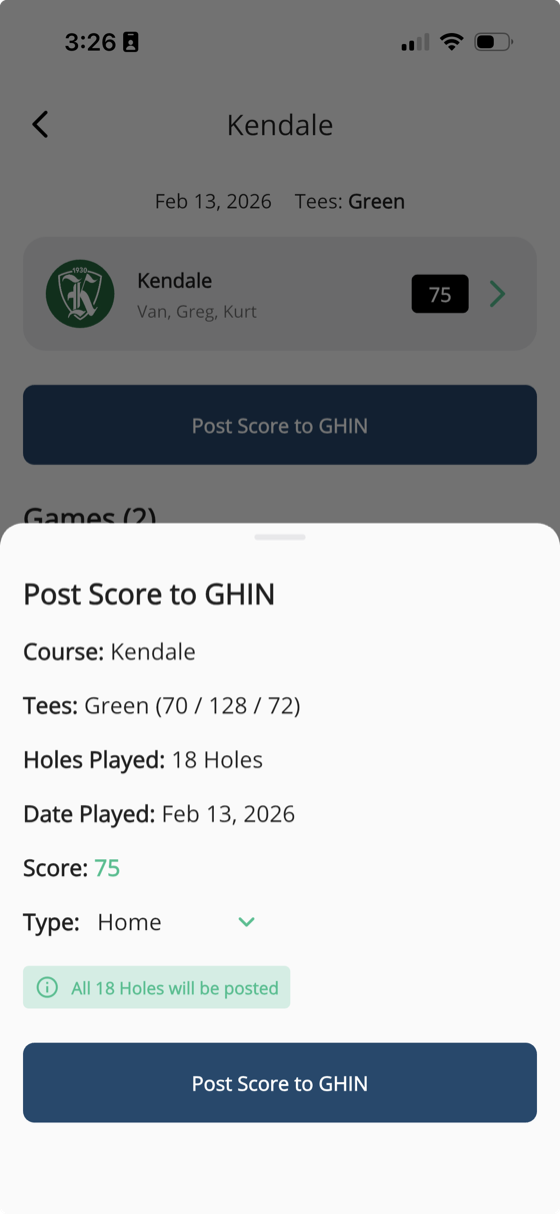
- Tap Post Score to GHIN on a completed round
- A details drawer will appear asking you to confirm a few things:
- Course and tees
- Date played
- Your score
- Round type (Home, Away, or Tournament)
- Double-check the round type — GolfApp will read whether it's your home course based on your GHIN membership, but it's worth confirming
- If it was a tournament round, select Tournament from the dropdown
- Tap Post Score to GHIN to submit
Requirements
- You must have a valid GHIN Handicap Membership (USGA)
- Your GHIN must be linked in GolfApp — see Linking your GHIN
- The round must be complete with scores entered
A few things to know
- Scores that have already been posted to GHIN won't show the post option again
- The Home/Away designation is based on your GHIN membership, but you can change it before posting
- Tournament rounds should always be marked as such — this affects how your handicap is calculated