After you enter scores, GolfApp generates a round scorecard for each group — whether you're playing solo, as a twosome, threesome, foursome, or any size group.
The round scorecard shows your gross (raw) scores along with helpful details like course handicaps and strokes given on each hole.
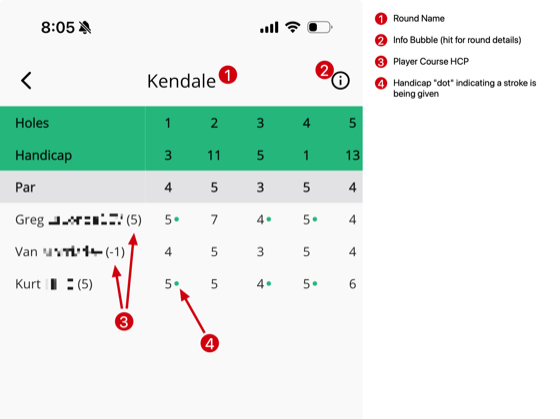
What's on the scorecard
- Round name — displayed at the top of the scorecard (e.g. "Kendale")
- Hole numbers — across the top row
- Handicap row — the difficulty ranking of each hole (1 being hardest)
- Par row — the par for each hole
- Player rows — each golfer's gross score, hole by hole
Course handicaps
Next to each golfer's name you'll see a number in parentheses — that's their course handicap for this round. For example, "Greg (5)" means Greg is playing off a 5 course handicap.
A negative number like "Van (-1)" means that golfer is giving strokes rather than receiving them.
Handicap dots
You'll notice small green dots next to some scores. These indicate that a golfer is receiving a handicap stroke on that hole.
The dots are based on the handicap row — strokes are allocated starting from the hardest-ranked holes (lowest handicap numbers) first. This makes it easy to see at a glance where each golfer is getting strokes.
Round details
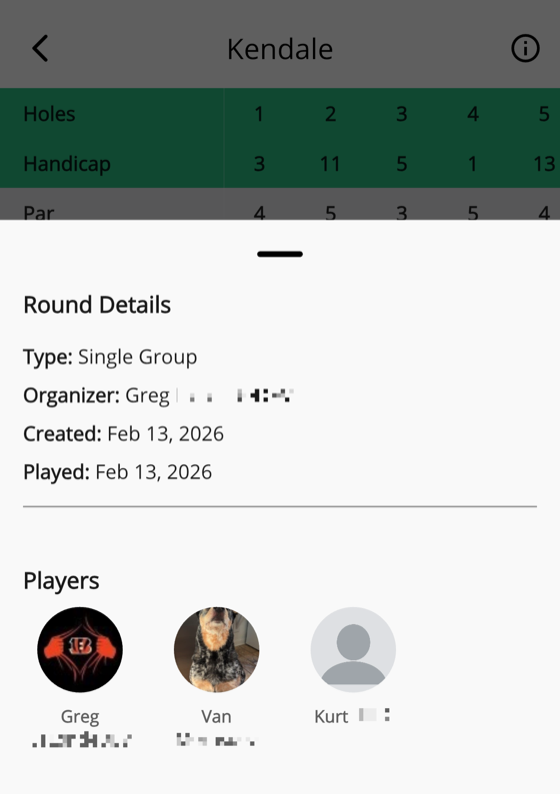
Tap the info bubble in the top-right corner of the scorecard to pull up more details about the round:
- Round type — Single Group, Trip, etc.
- Organizer — who created the round
- Created / Played dates
- Players — profile pictures and names of everyone in the round, with links to their profiles