A golf trip or event can be a lot of things — and GolfApp is built to handle all of them:
- Bachelor parties
- Guys, ladies, or couples golf trips
- Everyday multi-group rounds
Here are a few GolfApp features and setup tricks that make it all work.
Turn on multi-group
During round creation, toggle on the multi-group option. You'll notice an extra step gets added to your setup flow.
After that, make sure you add all the golfers who will be playing. Two foursomes? Add 8 golfers. Five foursomes? Add 20. If you have 12 spots but only 8 are filled, send out an invite to a close group of friends to fill in the last foursome.
Set your pairings
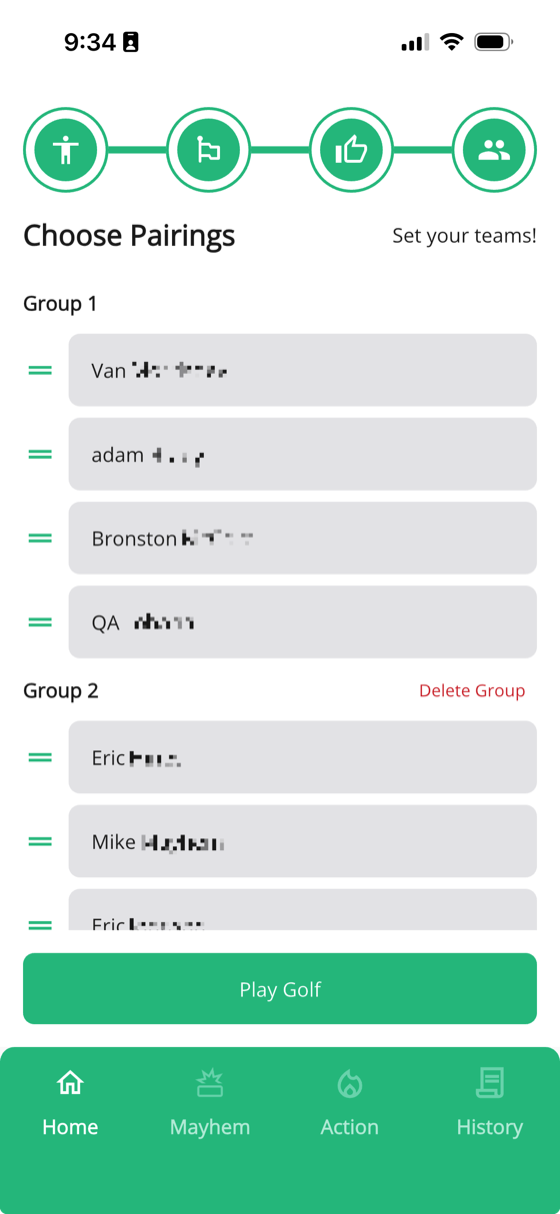
The rest of your round setup is the same — except for the pairings. Pay close attention here. This is where you set your exact foursomes, groups, and pairings.
Drag and drop golfers into the groups you want them in, and set the order you want them to appear on the scorecard. Usually, you'll want to make sure this matches the paper scorecard — if you're still using one.
Gather interest with invites
Another great way to organize a trip is by creating a round and sending out an invite. Let people mark their availability, fill your spots, and get everyone on the same page before the trip even starts. Check out our listener invites article to learn more about this feature.