The trip is sacred. The logistics are the enemy.
A golf trip with your buddies is the best weekend of the year. Four rounds, a leaderboard that means everything, and stories you'll retell for a decade.
What's not great: the guy doing math on a beer-soaked scorecard at dinner, the argument over who owes who, and the games that fizzle out by day two because nobody can keep track. The trip is sacred. The bookkeeping is the part that ruins it.
That's exactly what GolfApp is built for. Here's how to run a trip from first tee to final settle-up without a spreadsheet in sight.
1. Set up the trip, not just a round
In GolfApp, a trip is just a set of linked rounds — "Scottsdale 2026," "Bandon Buddies," whatever you call it. Each round keeps its own course, tees, and games, but everything lives together under one trip so the standings carry across the whole weekend.
Set it up once and every round you add slots into the same trip. (Full walkthrough: Setting up a trip.)
2. Lock your group once
Add your buddies as players a single time and they're in for every round of the trip — no re-entering names each morning. Someone joining late or only playing two of the four days? Add or drop them per round without breaking the rest of the standings.
Don't have everyone on the app yet? You can still include them — invite them in a tap, or add a player by name with an estimated handicap so the games still work. (See how to invite players.)
3. Pick your games — same all week or different every day
This is where a trip gets fun. You can run the same game every round for a season-long feel — a running team Nassau, say — or mix it up daily to keep everyone honest:
Day one: a 2v2 Nassau with auto presses.
Day two: individual Skins, carryovers and all.
Day three: Wolf, because someone always thinks they're a genius.
You just enter raw scores. GolfApp settles every game running on every round. Browse the full list of games, or get specific with our guides to the best betting games for 4 players and 3 players.
4. Keep mixed handicaps fair
Buddies trips are almost never a group of scratch golfers. You've got a 4 and a 22 in the same foursome, and the games only stay fun if everyone can actually compete.
GolfApp handles handicaps so the 22 has a real shot and the 4 can't coast. As an official USGA GHIN partner, it pulls your handicap index in automatically when you link your GHIN — no typing, no guessing, and it stays current all weekend. (Here's how to link your GHIN.) No GHIN? Set a manual estimate and play on.
5. Settle up without the headache
The worst part of any trip is the math at the end. GolfApp keeps a running tally across every game and every round, so when the trip wraps, the numbers are already done. No notebook, no "wait, what did I owe from Thursday," no trust falls over a calculator.
And when it's time to actually pay up, you don't leave the app to figure it out. Open any game, see exactly what you won or lost, and request or pay each player straight through Venmo — GolfApp even writes the game and result into the payment note, so nobody's squinting at a $20 request wondering what it was for.
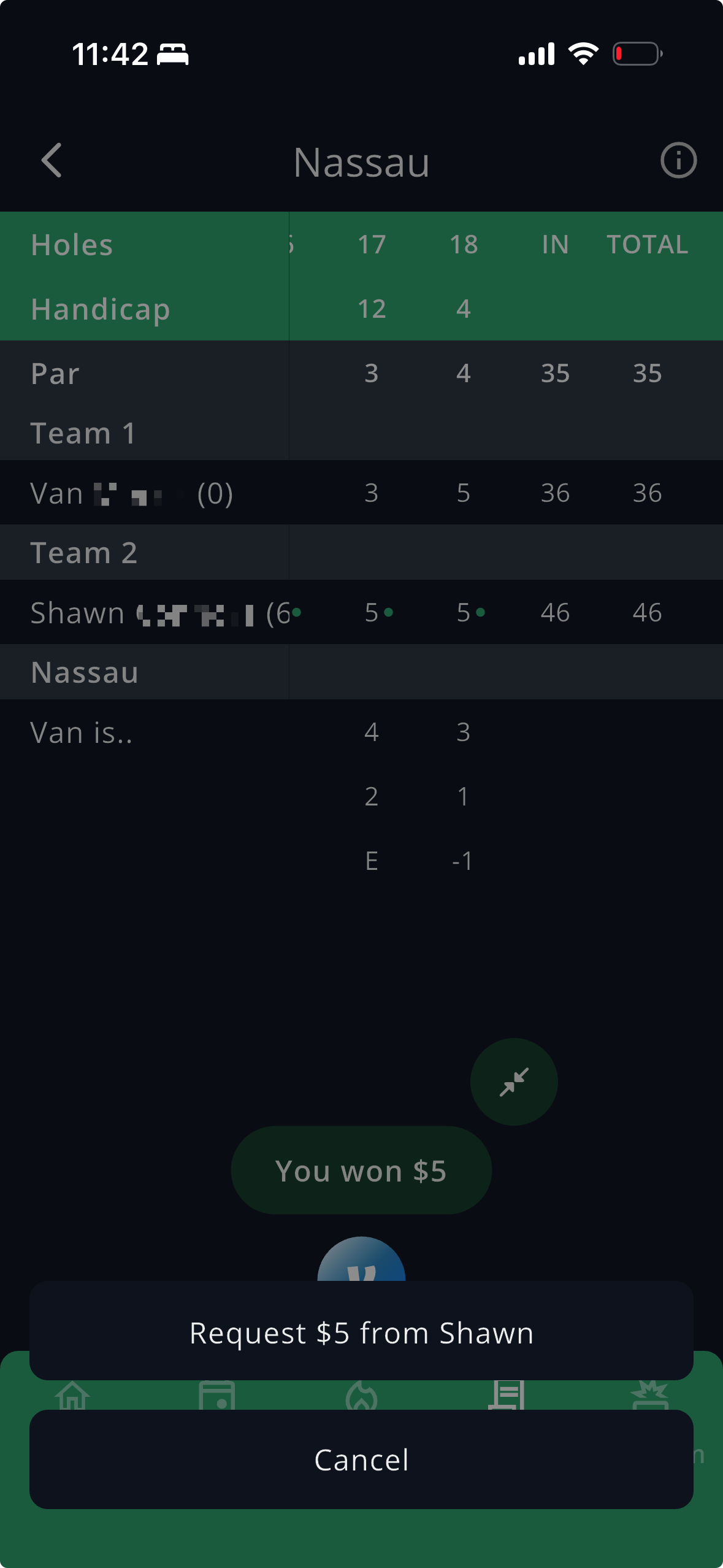
Everyone sees the same standings in real time. The trash talk has receipts — and so does the payout.
And it's free for the whole group
Here's the part that matters for a trip specifically: GolfApp is free for everyone. No subscription, no per-player fee, no "premium" tier that one guy has to buy for the games to work. A trip falls apart the moment half the group is locked out — so we never built it that way. The whole crew is in, every round, no catch.
One trip.
Every game.
Zero spreadsheets.
Get the group on the same app before you go. Download GolfApp free — then go enjoy the trip.
Enjoy the mayhem.